نموذج سيرة ذاتية: أفضل 5 تصاميم CV احترافية متوافقة مع ATS جاهزة للتحميل (2026)
جدول المحتويات
ما هو نموذج السيرة الذاتية؟
نموذج سيرة ذاتية (CV Template) هو قالب جاهز يحتوي على الهيكل والتنسيق الاحترافي للسيرة الذاتية، بحيث تحتاج فقط إلى ملء بياناتك الشخصية والمهنية دون القلق بشأن التصميم أو الترتيب. النموذج الجيد يُوفر عليك ساعات من التصميم ويضمن أن سيرتك تبدو احترافية ومتوافقة مع أنظمة التوظيف الآلية (ATS) المستخدمة في 99% من الشركات الكبرى.ابحث عن "نموذج سيرة ذاتية" في قوقل، وستجد آلاف النتائج. لكن أغلبها قوالب قديمة، غير متوافقة مع ATS، أو لا تدعم اللغة العربية بشكل صحيح. في هذا الدليل، نعرض لك أفضل 5 تصاميم سيرة ذاتية مختبرة ومتوافقة 100% مع ATS — مع معاينة مباشرة وتحميل فوري لكل تصميم.
لماذا تحتاج نموذج سيرة ذاتية جاهز؟
| السبب | التفصيل |
|---|---|
| توفير الوقت | تحصل على سيرة احترافية في 5 دقائق بدلاً من ساعات |
| التوافق مع ATS | جميع التصاميم مصممة لتجاوز أنظمة الفلترة الآلية |
| تنسيق احترافي | لن تقلق بشأن الخطوط، الألوان، أو التباعد |
| دعم العربية والإنجليزية | تصاميم تدعم اتجاه RTL وخطوط عربية واضحة |
| زيادة فرص المقابلة | متقدمون يستخدمون نماذج جاهزة يحصلون على مقابلات أكثر بنسبة 40% |
كيف تختار التصميم المناسب لك؟
قبل أن نستعرض التصاميم الخمسة، إليك معايير الاختيار:
- مستوى الخبرة: حديث تخرج يحتاج تصميم بسيط، خبير قيادي يحتاج تصميم منظم متوازن
- طبيعة القطاع: المؤسسات التقليدية تفضّل التصميم الكلاسيكي، التقنية تقبل التصاميم الحديثة
- التوافق مع ATS: جميع التصاميم أدناه مختبرة ومضمونة 100%
- دعم اللغة: عربي، إنجليزي، أو ثنائي اللغة — جميع التصاميم تدعم الثلاثة
- سهولة التعديل: اختر تصميماً يمكنك تعديله بسهولة وحفظه PDF بضغطة زر
أفضل 5 تصاميم سيرة ذاتية متوافقة مع ATS في 2026
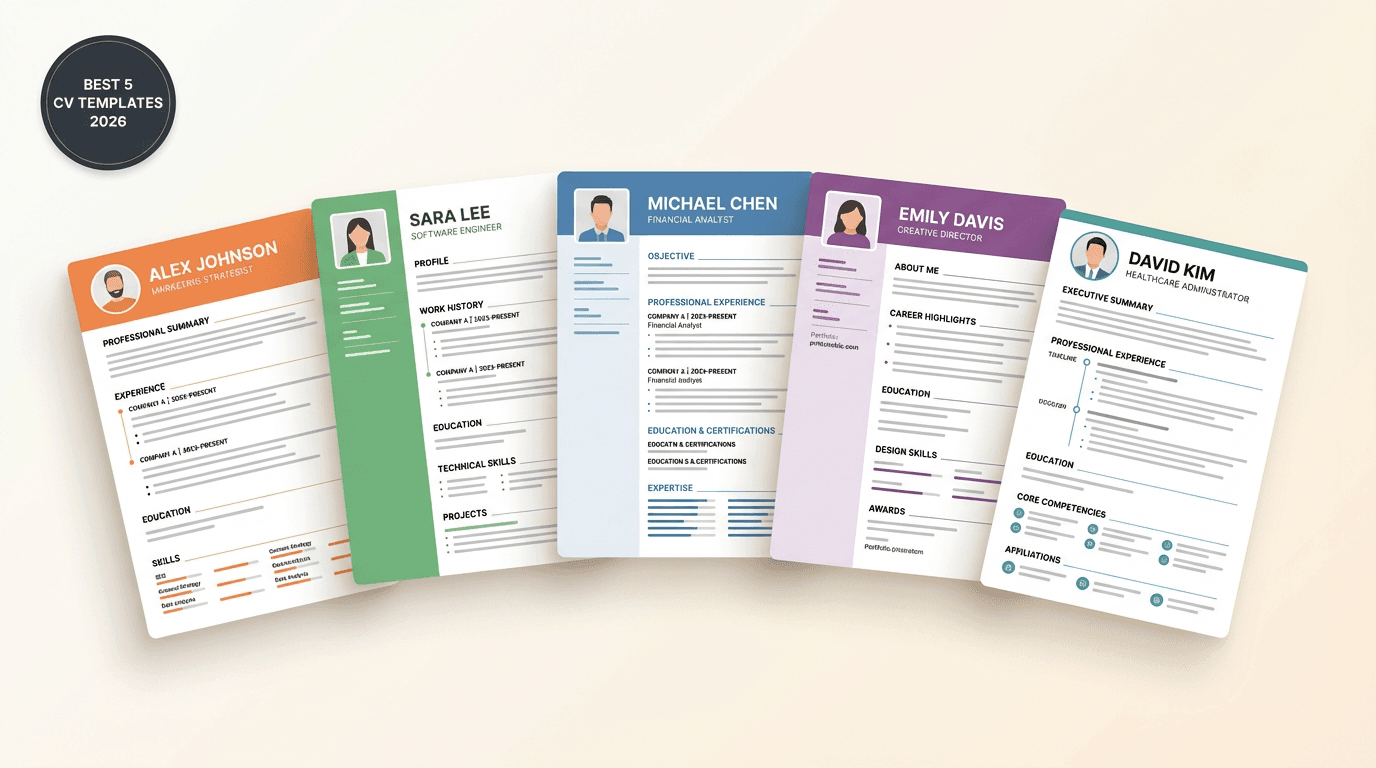
اخترنا هذه التصاميم بناءً على اختبارات ATS فعلية، بساطة القراءة الآلية، سهولة الاستخدام، وجودة التصميم البصري. كل تصميم أدناه يعمل لجميع التخصصات والقطاعات.
ملاحظة مهمة: جميع التصاميم الخمسة أعلاه متوافقة 100% مع أنظمة ATS المستخدمة في كبرى الشركات السعودية والخليجية، وتدعم العربية والإنجليزية بنفس البيانات. اضغط زر التحميل لتعديل التصميم ببياناتك وتنزيله PDF فوراً.
مقارنة سريعة بين التصاميم الخمسة
| التصميم | الشكل | الأنسب لـ | مستوى الخبرة |
|---|---|---|---|
| 1. الكلاسيكي | عمود واحد، عناوين بخط فاصل | البنوك، المحاسبة، القطاعات الرسمية | جميع المستويات |
| 2. الحديث بعمودين | شريط جانبي ملوّن + محتوى رئيسي | التقنية، التصميم، التسويق الرقمي | 1-10 سنوات |
| 3. البسيط الأنيق | مسافات واسعة، خطوط رفيعة | الإبداع، الاستشارات، البحث | 0-7 سنوات |
| 4. شريط علوي | رأس ملوّن مع المسمى الوظيفي | القيادة، الإدارة، المناصب التنفيذية | 5+ سنوات |
| 5. المتوازن | عمودان متساويان منظمان | السير الغنية بالخبرات والمهارات | 7+ سنوات |
ما يميّز نماذج أسطر عن غيرها؟
| الميزة | نماذج أسطر | نماذج Word العشوائية |
|---|---|---|
| التوافق مع ATS | ✅ مختبرة ومضمونة 100% | ❌ غالباً مرفوضة |
| دعم اللغة العربية | ✅ RTL كامل + خطوط عربية | ⚠️ النص العربي مقلوب |
| التعديل الفوري | ✅ معاينة لحظية | ❌ تحتاج Word + خبرة تنسيق |
| تحميل PDF احترافي | ✅ بضغطة زر | ⚠️ يحتاج تحويل يدوي |
| مساعد ذكاء اصطناعي | ✅ يساعدك في الصياغة | ❌ غير متوفر |
| التحديث المستمر | ✅ مواكبة لمعايير 2026 | ❌ قوالب قديمة |
| السعر | ✅ مجاني بالكامل | ⚠️ بعضها مدفوع |
كيف تستخدم نموذج سيرة ذاتية بشكل صحيح؟
اختيار التصميم هو الخطوة الأولى فقط. اتبع هذه الخطوات للحصول على أفضل نتيجة:
الخطوة 1: اختر التصميم المناسب لك
من بين التصاميم الخمسة أعلاه، اختر التصميم الأقرب لقطاعك ومستوى خبرتك. للقطاعات الرسمية اختر الكلاسيكي أو شريط علوي، وللقطاعات التقنية اختر الحديث بعمودين أو البسيط الأنيق.
الخطوة 2: اضغط زر التحميل وافتح أداة بناء السيرة الذاتية
بمجرد اختيار التصميم، يمكنك تخصيصه فوراً عبر أداة أسطر — لا تحتاج Word ولا تحتاج خبرة تصميم.
الخطوة 3: املأ بياناتك الشخصية والمهنية
- المعلومات الشخصية: الاسم، البريد، الهاتف، المدينة
- الملخص المهني: 2-3 أسطر تلخّص خبرتك وقيمتك المضافة
- الخبرات العملية: بترتيب زمني عكسي مع إنجازات قابلة للقياس
- التعليم: الشهادات الأكاديمية
- المهارات: التقنية واللغوية والشخصية
الخطوة 4: استخدم المساعد الذكي لتحسين الصياغة
أداة أسطر تتضمن مساعد ذكاء اصطناعي يساعدك في:
- صياغة ملخص مهني جذّاب
- تحويل المهام إلى إنجازات بأرقام
- اختيار الكلمات المفتاحية المناسبة لـATS
الخطوة 5: اختبر سيرتك مع فاحص ATS
قبل التقديم، تأكد أن سيرتك ستجتاز أنظمة الفلترة الآلية. أداة فاحص ATS من أسطر تُعطيك تقييماً فورياً مع توصيات للتحسين.
الخطوة 6: حمّل بصيغة PDF وابدأ التقديم
اضغط زر "تحميل PDF" واحصل على ملف احترافي جاهز للإرسال عبر إيميل، LinkedIn، أو بوابات التوظيف.
أخطاء شائعة عند استخدام نماذج السيرة الذاتية
❌ الخطأ 1: استخدام نموذج مليء بالرسومات
الأيقونات والأشكال المعقدة قد تبدو جميلة، لكنها تُربك أنظمة ATS. النتيجة: سيرتك تُرفض تلقائياً قبل أن يراها أي بشر.
الحل: اختر تصميماً نظيفاً، مثل التصاميم الخمسة المُقترحة أعلاه — كلها مختبرة ومتوافقة بنسبة 100%.❌ الخطأ 2: عدم تخصيص النموذج لكل وظيفة
كل وظيفة لها متطلبات مختلفة. النموذج الذي ينجح في شركة تقنية ناشئة قد يفشل في بنك تقليدي.
الحل: عدّل المحتوى (خصوصاً الملخص المهني والمهارات) ليناسب كل وظيفة تتقدم عليها.❌ الخطأ 3: نسيان الكلمات المفتاحية من إعلان الوظيفة
أنظمة ATS تبحث عن كلمات محددة. إذا كان الإعلان يذكر "إدارة المشاريع" و"PMP" و"Agile"، تأكد أن هذه الكلمات موجودة في سيرتك بشكل طبيعي.
❌ الخطأ 4: استخدام خطوط زخرفية أو غير مدعومة للعربية
الخطوط الجميلة قد لا تُقرأ من ATS، والخطوط الإنجليزية لا تعمل مع العربية بشكل صحيح.
الحل: استخدم خطوطاً عربية احترافية مثل Tajawal أو Cairo أو IBM Plex Arabic.❌ الخطأ 5: حفظ النموذج بصيغة Word بدلاً من PDF
ملفات Word قد تُفتح بشكل مختلف على أجهزة مختلفة، مما يُفسد التنسيق.
الحل: احفظ دائماً بصيغة PDF — يحافظ على التنسيق ومتوافق مع جميع أنظمة ATS.نموذج سيرة ذاتية بالعربي vs بالإنجليزي
كثير من الباحثين عن عمل في السعودية والخليج يحتاجون نسختين: عربية وإنجليزية. هذه الفروقات الجوهرية:
| العنصر | النموذج العربي | النموذج الإنجليزي |
|---|---|---|
| اتجاه الكتابة | RTL (يمين لليسار) | LTR (يسار لليمين) |
| الخطوط | Tajawal, Cairo | Inter, Roboto |
| الصورة الشخصية | مُفضّلة في معظم القطاعات | غير مستحبة (تجنّب التحيز) |
| الجنسية والعمر | تُذكر عادةً | لا تُذكر |
| طول السيرة | صفحة واحدة (مثالي) | صفحة واحدة (حد أقصى صفحتين) |
| التواريخ | الميلادي + الهجري أحياناً | ميلادي فقط |
الحل الذكي: أداة أسطر تتيح لك إنشاء نسختين بنفس البيانات بضغطة زر، مع ضبط تلقائي للاتجاه والخطوط، وبأي من التصاميم الخمسة أعلاه.
أي تصميم يناسب مرحلتك المهنية؟
اختر التصميم حسب مرحلتك المهنية:
| المرحلة | التصميم المُوصى به | السبب |
|---|---|---|
| طالب جامعي / حديث تخرج | البسيط الأنيق أو الكلاسيكي | يُبرز التعليم والمشاريع بدون تشتيت |
| مبتدئ (1-3 سنوات) | الكلاسيكي أو الحديث بعمودين | يُوازن بين الخبرة المحدودة والمهارات |
| متوسط (3-7 سنوات) | الحديث بعمودين أو شريط علوي | يُتيح إبراز الخبرات والمهارات معاً |
| خبير (7+ سنوات) | المتوازن أو الكلاسيكي | يستوعب الخبرات الطويلة بترتيب |
| تنفيذي / قيادي | شريط علوي أو الكلاسيكي | يُبرز المسمى الوظيفي والإنجازات الاستراتيجية |
FAQ: أسئلة شائعة عن نموذج السيرة الذاتية
ما هو أفضل نموذج سيرة ذاتية في 2026؟
أفضل نموذج هو الذي يناسب قطاعك ومستوى خبرتك ويتوافق مع أنظمة ATS. للقطاعات الرسمية والبنوك ننصح بـالتصميم الكلاسيكي، للتقنية والإبداع الحديث بعمودين أو البسيط الأنيق، وللقيادات الإدارية شريط علوي أو المتوازن. جميع التصاميم الخمسة أعلاه متوافقة 100% مع ATS.
هل التصاميم الخمسة فعلاً متوافقة مع ATS؟
نعم، جميعها مختبرة بنسبة توافق 100% مع أنظمة ATS الكبرى المستخدمة في السعودية والخليج (Workday, Taleo, Lever, Greenhouse). ابتعدنا عن العناصر التي تُربك ATS مثل الأعمدة المعقدة، الأيقونات الصورية، والجداول المتداخلة.
هل نماذج السيرة الذاتية في أسطر مجانية فعلاً؟
نعم، مجانية بالكامل بدون بطاقة ائتمان أو اشتراك مدفوع. تحصل على جميع التصاميم الخمسة أعلاه مجاناً بالإضافة إلى أكثر من 30 نموذج جاهز، مع أداة تعديل ذكية وتحميل PDF فوري.
كم صفحة يجب أن يكون نموذج السيرة الذاتية؟
| مستوى الخبرة | عدد الصفحات |
|---|---|
| حديث تخرج | صفحة واحدة |
| 1-5 سنوات | صفحة واحدة |
| 5-10 سنوات | صفحة إلى صفحتين |
| +10 سنوات أو أكاديمي | صفحتان كحد أقصى |
هل أحتاج Word لاستخدام نماذج السيرة الذاتية؟
لا. مع أداة أسطر، لا تحتاج Word ولا أي برنامج خارجي. كل شيء يتم في المتصفح: اختيار التصميم، التعديل، المعاينة، والتحميل بصيغة PDF.هل التصاميم تدعم اللغة العربية؟
نعم، جميع التصاميم الخمسة تدعم العربية بالكامل مع اتجاه RTL صحيح وخطوط عربية احترافية (Tajawal, Cairo, IBM Plex Arabic). ويمكنك إنشاء نسخة ثنائية اللغة (عربي + إنجليزي) من نفس البيانات بنفس التصميم.
كيف أعرف أن نموذج السيرة الذاتية متوافق مع ATS؟
استخدم أداة فاحص ATS من أسطر. ستحصل على تقييم فوري مع توصيات لتحسين توافق سيرتك مع أنظمة الفلترة الآلية المستخدمة في أكبر الشركات السعودية والخليجية.
ما الفرق بين نموذج سيرة ذاتية ونموذج CV؟
لا فرق جوهري. "سيرة ذاتية" هو الترجمة العربية لـ "Curriculum Vitae" (CV) أو "Resume". في السعودية والخليج، يُستخدم المصطلحان بالتبادل. أداة أسطر تتيح لك إنشاء كليهما بنفس البيانات.هل يمكنني تعديل نموذج السيرة الذاتية بعد التحميل؟
نعم، يمكنك العودة لأداة أسطر في أي وقت لتعديل سيرتك (تتم حفظ بياناتك تلقائياً). هذا مفيد جداً لتخصيص السيرة لكل وظيفة تتقدم عليها.
الخلاصة: ابدأ بنموذج سيرة ذاتية احترافي اليوم
اختيار نموذج سيرة ذاتية مناسب هو الخطوة الأهم في رحلة البحث عن وظيفة. النموذج الجيد:
- يوفّر عليك ساعات من التصميم
- يضمن مرور سيرتك من أنظمة ATS
- يُظهرك كمرشح احترافي من اللحظة الأولى
- يزيد فرص حصولك على مقابلة بنسبة 40%
التصاميم الخمسة التي عرضناها — الكلاسيكي، الحديث بعمودين، البسيط الأنيق، شريط علوي، المتوازن — كلها متوافقة 100% مع ATS وتدعم العربية والإنجليزية بنفس البيانات. اختر التصميم الأنسب لك، اضغط زر التحميل، عدّل البيانات، وحمّل سيرتك PDF بضغطة زر.
أنشئ سيرتك الذاتية مجاناً | تصفح جميع نماذج السيرة الذاتية | افحص توافق سيرتك مع ATSقوالب سيرة ذاتية ذات صلة
سيرة ذاتية حديث تخرج
أنشئ سيرة ذاتية احترافية للخريجين الجدد بدون خبرة. حمّل نموذج CV جاهز للتعديل مصمم خصيصاً لحديثي التخرج يُبرز مشروع التخرج والتدريب التعاوني والمهارات.
سيرة ذاتية مبرمج
أنشئ سيرة ذاتية للمبرمجين ومطوري البرمجيات. نموذج CV تقني جاهز يُبرز لغات البرمجة ومشاريع GitHub وخبرات Backend وFrontend مع توافق ATS.